 how-to
How to Use AI for Clothing Fit: A Step-by-Step Guide
Table of Contents
- How AI for Clothing Fit Works
- How to Measure Your Body Accurately for AI Sizing
- Step-by-Step Guide to Using AI Fitting Tools
- Understanding AI Sizing Recommendation Tools
- Accuracy and What to Expect From AI Garment Rendering
- Privacy and Data Security When Uploading Photos
- Common Mistakes to Avoid
- Frequently Asked Questions
Last Updated: September 28, 2026
How AI for Clothing Fit Works
Learning how to use AI for clothing fit involves understanding how computer vision and body mapping analyze your body shape and proportions from photos. The technology processes your full-body images to identify key measurement points, then compares those measurements against size charts from different brands.
Here's what happens behind the scenes: The AI recognizes your shoulders, waist, hips, inseam, and other critical points. It builds a digital model of your body type and proportions. Then it applies that model to garment data, fabric type, brand sizing quirks, stretch properties, to predict how clothes will actually fit you.
This approach solves a real problem. Sizing charts are inconsistent across brands. One brand's medium might be another's large. Traditional apps ask you to measure yourself manually, which introduces human error. AI-powered systems automate this process and account for how different fabrics drape on different body types.
The result is sizing recommendations tailored to your unique shape, not just your height and weight.
How to Measure Your Body Accurately for AI Sizing
Accurate measurements are the foundation of reliable sizing recommendations. Even advanced AI can't work with poor input data. Your photos need to show your actual body shape clearly so the computer vision system can map your proportions correctly.
Preparing Your Photos
Start with proper lighting. Natural daylight is ideal, position yourself near a window or shoot outdoors. Avoid harsh shadows or backlighting, which obscure body contours. Your phone's camera works fine, but make sure the entire frame is well-lit.
Wear fitted clothing that shows your body shape. Tight jeans and a fitted shirt or tank top work best. Avoid baggy clothes, heavy sweaters, or layered outfits, these hide your actual silhouette. The AI needs to see your real body proportions to make accurate predictions.
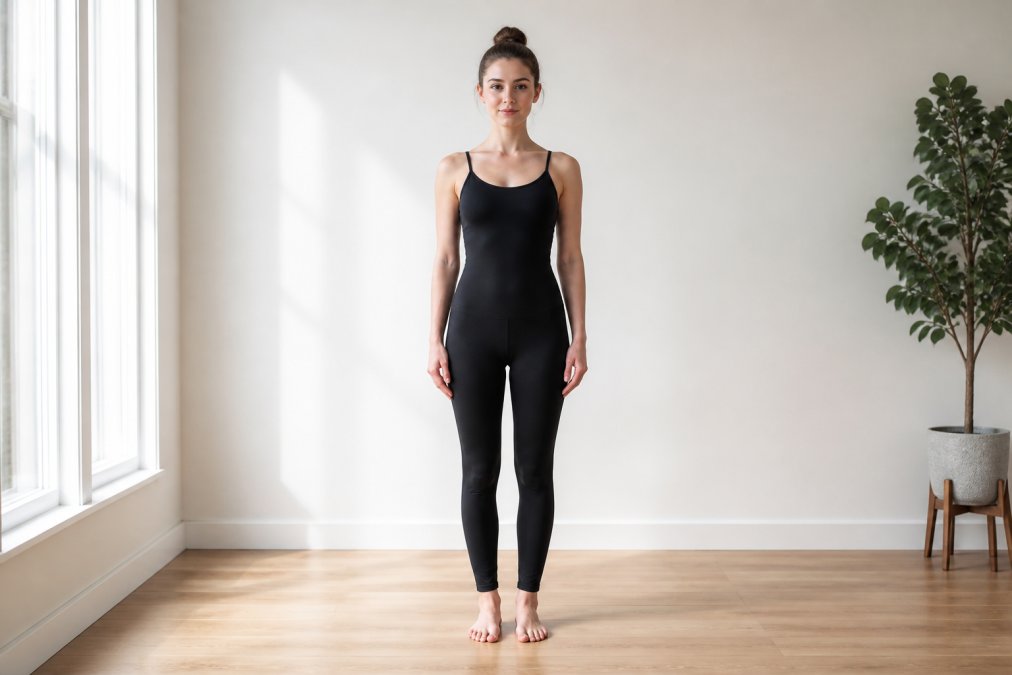
Take multiple angles:
- Full-body front view (head to feet)
- Full-body side view (profile)
- Full-body back view (if the app requests it)
Each photo should capture you from roughly the same distance. Step back far enough that your entire body fits in the frame with some space around you.
Positioning for Accurate Body Mapping
Stand in a neutral position with arms slightly away from your sides. Don't flex or pose unnaturally. The AI works best when your body is relaxed and in a natural standing position.
Keep your feet about shoulder-width apart. Stand straight but not rigid. Look directly at the camera for front-facing photos. This neutral stance helps the computer vision system identify body landmarks consistently.
Avoid tilting your head, leaning, or turning your torso. The AI calculates proportions based on body alignment, so even small angles can skew measurements. Think of it like a fitting room mirror, you want a true, unobstructed view of how you actually look.
Step-by-Step Guide to Using AI Fitting Tools
Understanding how to use AI for clothing fit involves following a straightforward process. Most platforms follow a similar workflow, though specific steps vary by tool.
Step 1: Upload Your Full-Body Photos
Start by creating an account and navigating to the photo upload section. Select the photos you prepared, front, side, and back views. The system will process these images immediately.
The upload typically takes 30 seconds to a few minutes depending on file size and your internet connection. The AI analyzes each photo in real time, mapping your body dimensions and creating a digital profile of your proportions.
You'll see a preview showing how the system detected your key measurement points. Review this preview to confirm the body mapping looks accurate. If the AI misidentified your shoulders, waist, or hips, you can re-upload clearer photos.
Step 2: Input Your Measurements and Preferences
After photos are processed, you'll enter additional information. This typically includes:
- Your height and weight (for context)
- Any known measurements (bust, waist, hips, inseam)
- Fit preferences (tight, fitted, relaxed, oversized)
- Fabric preferences (stretch vs. non-stretch)
- Brands you shop from regularly
This step takes 2-3 minutes. The more information you provide, the better the system can tailor recommendations. If you shop frequently from specific brands, listing them helps the AI learn your preferences and brand-specific sizing patterns.
Some platforms let you save these preferences so you don't re-enter them for every recommendation.
Step 3: Review Size Recommendations Across Brands
Once you've input your data, the AI generates size recommendations for different brands and garment types. You'll see results like:
- Zara: size 8
- H&M: size 10
- ASOS: size 6
- Everlane: size 8
Each recommendation accounts for that brand's specific sizing tendencies. This is where AI for clothing fit delivers real value, it learns the quirks of different retailers and adjusts accordingly.
Browse through the recommendations. Notice which brands align with your usual size and which ones differ. This information helps you understand your fit profile across the retail landscape.
Step 4: Check Fit Assessment Details
Most platforms provide detailed fit assessments beyond just size numbers. This might include:
- Expected fit (tight, true-to-size, loose)
- Fabric stretch considerations
- Length predictions for different body proportions
- Specific notes about brand-specific fits
Read these details before shopping. If the assessment says a brand runs small with limited stretch, that informs your purchasing decision. Some tools even let you filter by fit preference, show me only brands that will fit relaxed, for example.
Understanding AI Sizing Recommendation Tools
AI sizing recommendation tools combine body measurement analysis with brand sizing databases. The core technology uses computer vision to extract your body dimensions from photos, then applies machine learning algorithms to predict fit across different garments and brands.
These tools work because they learn from historical data. When thousands of users upload photos, receive recommendations, and provide feedback on fit accuracy, the system improves.
Accuracy and What to Expect From AI Garment Rendering
AI garment rendering, how the system visualizes how clothes will fit your specific body, has improved dramatically but still has limitations. The technology can accurately predict fit for standard garments with predictable fabric behavior. A basic cotton t-shirt or standard jeans? The AI handles these well.
Several factors affect accuracy:
- Photo quality: Blurry images or poor lighting reduce accuracy
- Your body type: Standard proportions get more accurate predictions than extreme body types
- Garment complexity: Simple, standard cuts are predicted more accurately than unusual designs
- Brand consistency: Brands with consistent sizing are easier to predict than those with variable quality control
Privacy and Data Security When Uploading Photos
Uploading full-body photos raises legitimate privacy concerns. You're sharing intimate images with a company, and you deserve to know how that data is handled.
Key questions to ask:
- Are photos deleted after processing or stored indefinitely?
- Can you request deletion of your data?
- Is your data sold to third parties?
- Who has access to your images internally?
- Is the data used to train AI models?
Common Mistakes to Avoid
The most common mistake is uploading poor-quality photos. Blurry images, bad lighting, or awkward angles give the AI garbage input, resulting in useless recommendations. Spend two minutes preparing proper photos rather than wasting time on inaccurate results.
Frequently Asked Questions
How accurate is AI for clothing fit compared to traditional sizing charts?
AI for clothing fit uses computer vision and body mapping to analyze your unique proportions, which is more precise than generic sizing charts. Traditional charts assume standard body types, but AI adapts to your individual measurements, posture, and the specific fit characteristics of different brands. Accuracy depends on photo quality and proper positioning, clear, well-lit images from multiple angles produce the most reliable size recommendations. Most users report better fit consistency and fewer returns when using AI-powered tools versus relying on charts alone.
Is it safe to upload full-body photos for AI sizing recommendations?
Data security depends on the platform you choose. Look for tools that clearly state how photos are stored, processed, and deleted. Reputable AI sizing platforms use encryption, don't share images with third parties, and delete photos after analysis. Before uploading, review the privacy policy to understand data retention practices. Many platforms process images locally on your device rather than storing them on servers. If privacy concerns persist, start with a single test upload to a trusted provider before committing to regular use.
Can AI sizing tools account for different body types and proportions?
Yes, AI body type analysis is designed to work across diverse body shapes and sizes. Advanced algorithms use body mapping and pose estimation to identify your unique proportions rather than forcing you into preset categories. This means curvier figures, tall frames, athletic builds, and all other body types receive tailored recommendations. However, accuracy improves when the AI has seen training data representing your specific body type. If initial recommendations feel off, refining your profile or re-uploading clearer photos often improves results.
Do I need to upload photos every time I shop, or does the app remember my measurements?
Most AI sizing tools save your measurements and body profile after the first upload, so you don't need to re-upload photos for every purchase. Your profile typically includes body dimensions, preferred fit preferences, and brand-specific sizing history. You can then search for items, select your size based on stored recommendations, or request a fit assessment for a new garment without re-photographing. Some platforms allow you to update your profile periodically if your measurements change, making the process faster and more convenient over time.